On-Device AI · No Internet Required

AI Labels Damage
As You Shoot

Point your camera at a damaged area. On-device AI draws bounding boxes, writes the label, and stamps GPS — before you move to the next room. Export Xactimate-ready files in one tap.

Download on the App Store

Free 7-day trial · No credit card

2+ Hours saved per claim
100% Offline — works anywhere
AES‑256 Encrypted data
The old way is broken

Stop losing hours to photo renaming

Before ClaimCam
45–60 min per claim
  • Snap photo
  • Cable transfer to PC
  • Open folder, find photos
  • Rename 30+ files one by one
  • Drag into estimating software
With ClaimCam
Under 5 min
  • Snap photo — AI labels it instantly
  • Skipped
  • Skipped
  • Skipped
  • Export ZIP → Done

Two steps. Every claim documented.

Step 1

AI Spots Damage Before You Blink

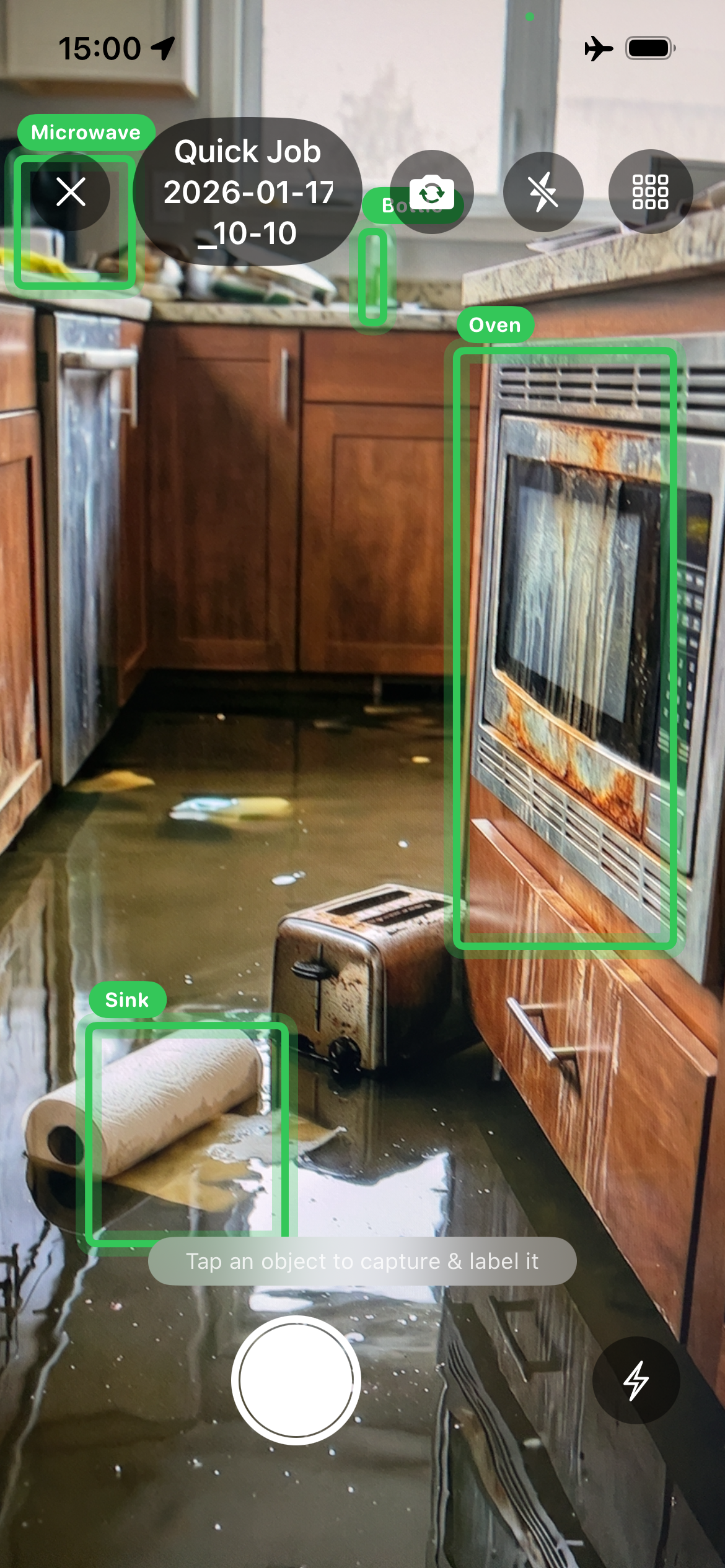
Point your camera and real-time bounding boxes lock onto every object in frame — Microwave, Sink, Oven, anything. Tap the damaged item you want to document. The AI never needs Wi-Fi; it runs entirely on your iPhone.

  • Live bounding boxes on every object
  • Tap to select the damaged item
  • 100% on-device — no data sent anywhere
ClaimCam live AI damage detection with bounding boxes on flooded kitchen
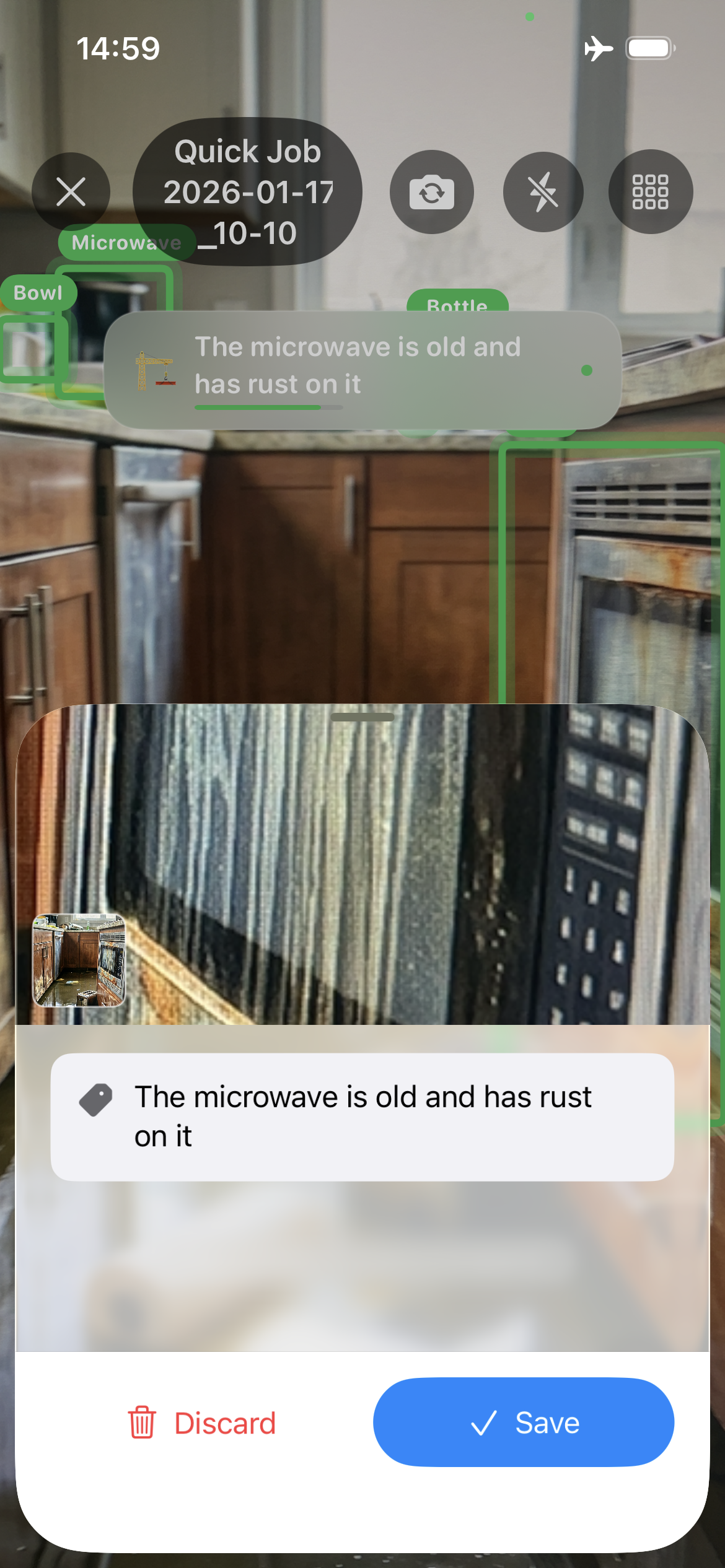
ClaimCam AI-generated damage label on review sheet
Step 2

Label Written. You Just Confirm.

After you tap the shutter, the on-device AI analyzes the selected object and writes a natural-language damage description — "The microwave is old and has rust on it." Review it, edit if needed, and save. No typing.

  • AI generates the label automatically
  • Edit or save with one tap
  • GPS coordinates embedded in every photo

Everything else you need

Xactimate-Ready Exports

One tap generates a ZIP with auto-named files. Drag straight into Xactimate, CoreLogic, or any estimating platform — no manual renaming.

Works 100% Offline

Basements, storm zones, rural dead zones — AI, GPS, and capture all work without signal. Photos sync automatically when you reconnect.

GPS-Stamped Evidence

Every photo permanently embeds precise coordinates, date, and time. Dispute-proof documentation that shows exactly where and when damage was recorded.

AES-256 Encrypted

Client data protected with bank-level encryption, biometric authentication, and secure cloud backup. Private by design — no tracking, no ads.

Snap to Xactimate in under 5 minutes

1

Create Job

Enter claim details or tap "Continue as Guest." GPS auto-fill completes the address instantly.

2

Point at Damage

Real-time bounding boxes appear around detected objects. Tap the damaged item you want to capture.

3

Review AI Label

Tap the shutter. AI writes the damage description. Review and save — or edit in seconds.

4

Export to Xactimate

One tap generates a perfectly named ZIP. AirDrop to your laptop and drag into Xactimate.

Trusted by insurance professionals

★★★★★
"ClaimCam cut my photo documentation time from 45 minutes to under 5. Game changer for my workflow."
Mike R. Independent Adjuster
★★★★★
"The AI labels are incredibly accurate. I stay focused on the inspection instead of typing notes on my phone."
Sarah K. Staff Adjuster
★★★★★
"Finally an app that understands the adjuster workflow. Xactimate exports are perfect every single time."
David L. Public Adjuster

Frequently asked

What is ClaimCam?

ClaimCam is an iOS app built for independent insurance adjusters, staff adjusters, and restoration contractors. It uses on-device AI to detect property damage in real time — drawing bounding boxes around damaged areas and automatically generating descriptive labels like "Water stain on ceiling" or "Cracked roof tile." Photos are GPS-stamped, AES-256 encrypted, and exported as properly named ZIP files ready for Xactimate and other estimating platforms.

How does the AI work?

ClaimCam uses two on-device AI models that run entirely on your iPhone — no internet required. The first performs live object detection, drawing bounding boxes around objects in the camera view. The second analyzes the selected object and generates a natural-language damage description. Both run locally via Apple's Core ML framework, so your photos never leave your device for AI processing.

Does ClaimCam work without internet?

Yes — 100% offline. AI detection, photo capture, GPS stamping, labeling, and local storage all work without any network connection. Critical for basements, rural properties, and storm zones. Photos sync to the cloud automatically when you reconnect.

Does it export to Xactimate?

Yes. One-tap export generates a ZIP with auto-named files following the structured naming convention used by Xactimate and CoreLogic. Drag the folder directly into your estimating software — no manual renaming.

How much does ClaimCam cost?

ClaimCam offers a free 7-day trial with no credit card required. After the trial: $29/month or $299/year (save $49). All features included. Cancel any time through your Apple ID settings.

Who is ClaimCam designed for?

ClaimCam is designed for anyone who documents property damage professionally: Independent Adjusters (IA), Staff Adjusters, Public Adjusters, Catastrophe (CAT) Adjusters, Restoration Contractors, and Property Inspectors.

Start free. Cancel anytime.

Monthly

$ 29 /month
  • Unlimited photos
  • Live AI damage detection
  • Automatic AI labels
  • GPS-stamped evidence
  • Xactimate exports
  • Cloud backup
Start Free Trial

7-day free trial · No credit card required · iOS 16+

Stop Renaming Photos at Midnight

AI labels every shot before you move to the next room

Download on the App Store

Free 7-day trial · iOS 16+ required · No credit card needed